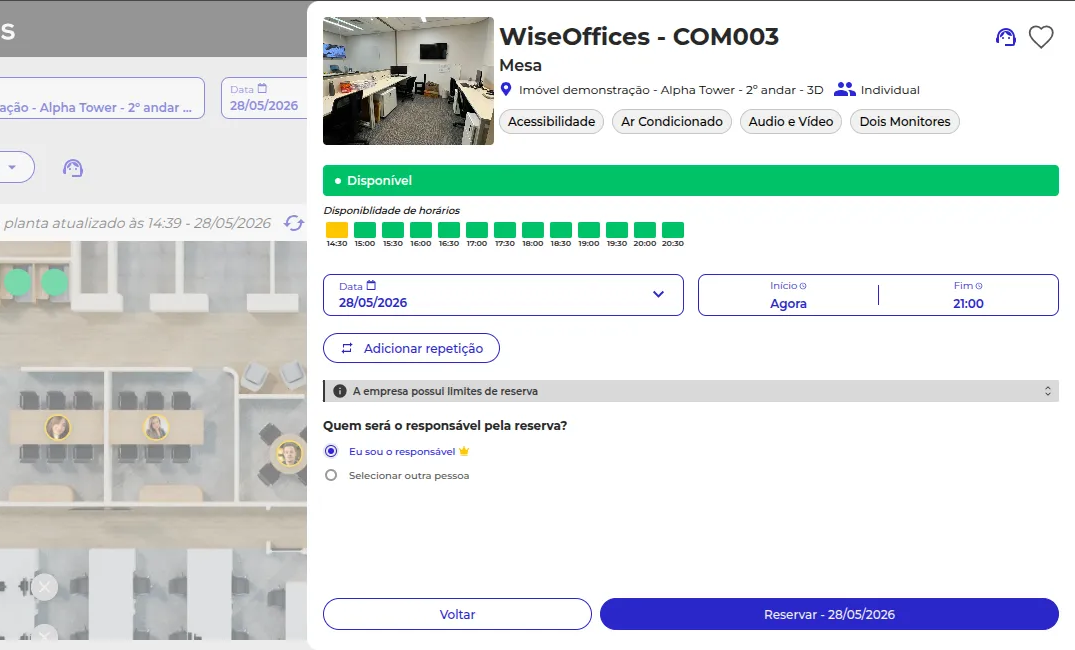
Desk booking
with just 2 clicks
Your office can cost R$40,000 per workstation per year, but without real occupancy data, you can't justify that cost (or even see it). WiseDesk turns every booking into data.
Optimize my workspace+100k
users
+800%
growth in 2025
+3M
interactions/year
Large companies already use WiseOffices









The hybrid model changed where people work, but the real estate contract does not know that.
In most companies, the number of workstations was defined before the pandemic and has not changed. The team went remote, came back in a hybrid model, and the office is still paid for as if it were full every day.
The facilities manager feels this. They see empty desks every Monday and Friday. They hear complaints about occupied desks every Tuesday, Wednesday, and Thursday. But there are no numbers to show leadership, and without numbers, there is no argument to change anything.
WiseDesk is the number that was missing.
Schedule a WiseDesk demoThe calculation nobody is doing, but should be
Calculate the real cost of your space
R$40,000 per workstation per year. Rent, energy, cleaning, and infrastructure.

300 workstations, 40% empty most of the time, 120 workstations nobody uses, R$4.2 million per year in wasted space.

WiseDesk shows this calculation and gives the manager the data to
present it.
Simple for those who book, powerful for those who manage

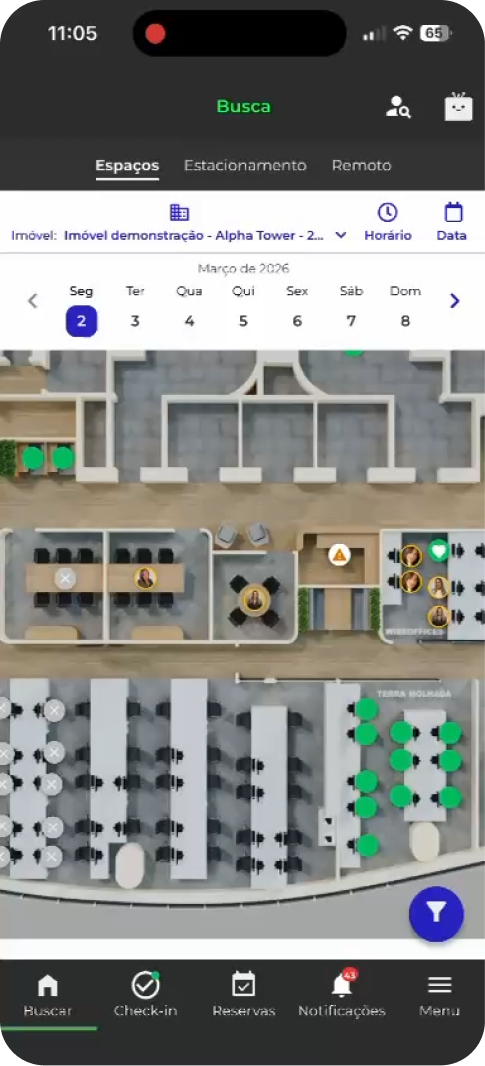
3D office map: choose the workstation on an interactive map, not by code
Colleague search: team members can go on the same day without coordinating via WhatsApp
Recurring bookings for those with fixed office days
QR Code check-in: if nobody shows up, the workstation is released automatically
Configurable rules by workstation type, floor, or user group
Simple for those who book, powerful for those who manage
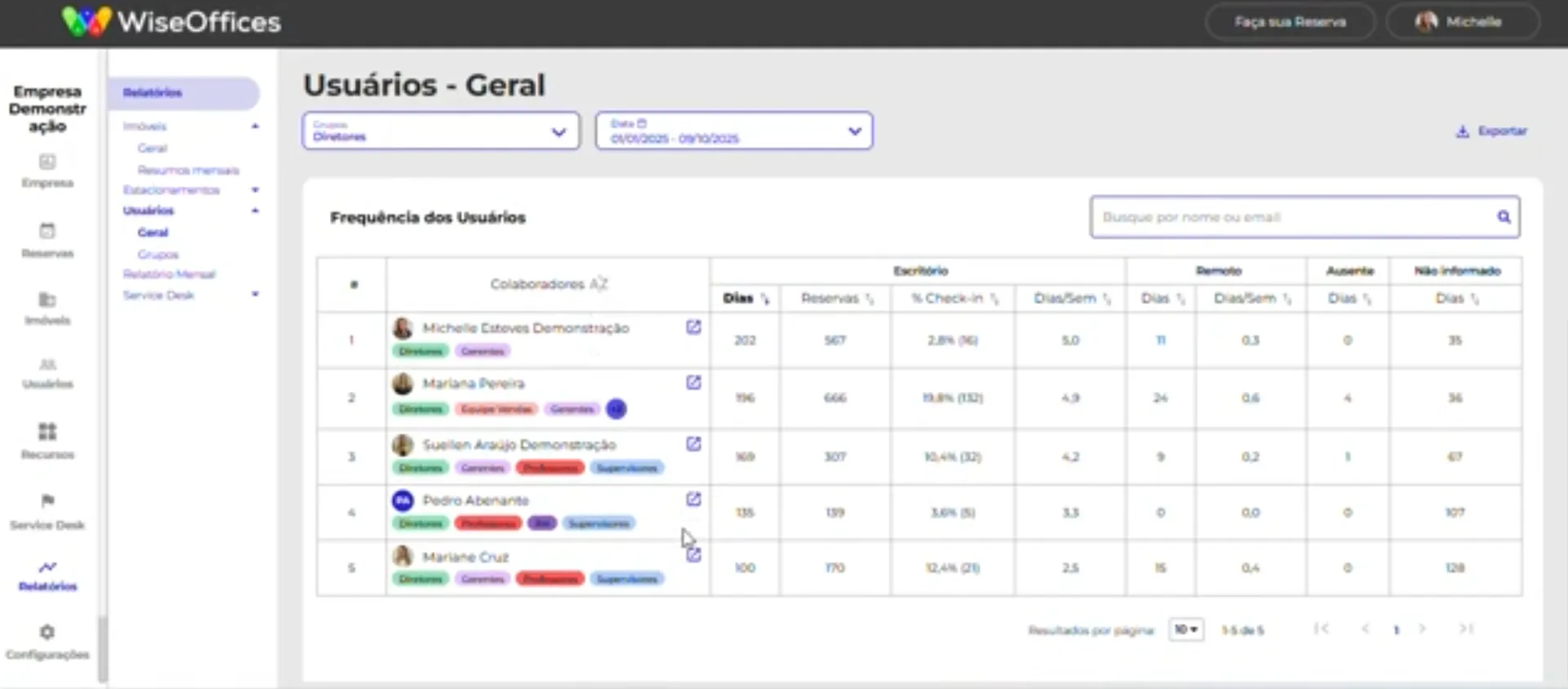
Which floors and areas are most used and on which days

Gap between booked workstations and workstations actually occupied
Attendance frequency by employee and by team
Basis for decisions on expansion, reduction, or reorganization of space
Access configuration by group and profiles
Usage time and booking limit configuration per period



Automatic check-in completed
 AUTOMATIC CHECK-IN
A booking is an intention, occupancy is a fact,
but only one of them pays the rent
Every booking system has the same problem: it depends on the employee to be accurate. Someone who booked but did not show up distorts the data. Someone who checks in from home while also reserving a desk corrupts the report.
The result: a dashboard full of numbers that reflect nothing.
Automatic Check-in closes that gap. Presence is recorded via corporate Wi-Fi, a camera with embedded AI, or access control integration, without anyone needing to do anything.
Discover
Other add-ons available for your project

Automatic Check-in (Wi-Fi)
Real presence via corporate network, no employee action needed, no additional hardware.

Automatic Check-in by camera
Requires hardware and prior technical assessment.

Automatic Check-in by turnstile
Depends on integration with physical access control system.

Access Control
Integration with turnstile and physical access systems. Upon request.

Automatic Visitor Management
QR Code flow with automatic turnstile release. Depends on the Access Control module.

WhiteBox Analytics
Custom space intelligence dashboards for each persona.
The advantage of subscribing is in what
WiseDesk delivers after the booking
What the market offers

Workstation booking
List of available workstations
Manual check-in
Booking report
Standalone system
Settings and configurations
What WiseDesk delivers
Booking + real occupancy data + attendance data
Interactive 3D map: employees see the office, not a spreadsheet
Secure automatic check-in with no need for human intervention
Occupancy intelligence for real estate decisions
Part of the Workplace OS: data connected with WiseSense, Analytics, and WiseTicket
Workstation access and time and booking limits

The system your employees will use and never abandon
Unlike most tools out there that teams abandon, WiseDesk was designed to:
Zero friction for users.
Interactive space map.
Booking in 2 clicks from the office map.
Native iOS and Android app, not a browser link.
Usability is not a luxury, it is a guarantee of ROI.
Ready for IT approval in the certification process


Implementation in 5–10 business days*, with no technical resources required from the client
Native iOS and Android app
99.97% uptime | Grade A SecurityScorecard | LGPD compliant



ENTRA ID: automatic user provisioning (add-on)
SSO included (Google, Microsoft)
Two-way integration with Google Calendar and Microsoft Outlook
*Estimated timeframe that may vary depending on the number of plants the client orders.
Have any questions?
Check the most frequently asked questions

Need more
help?
Talk to our team
1. What is hot desking and how does WiseDesk make this model work?
Hot desking is the model in which employees do not have a fixed desk and choose where to sit each day in the office. WiseDesk is the system that makes this model work in practice: the employee books the workstation through the native app, checks in upon arrival, and the workstation is released automatically if nobody shows up within the configured time limit.
2. Does WiseDesk support fixed and flexible workstations in the same office?
Yes. Fixed workstations are locked to a specific employee and do not appear for booking. Flexible workstations enter the hot desking pool. Both models coexist on the same 3D map, with no separate configuration.
3. Is the booking confirmation check-in required in WiseDesk?
Configurable by the administrator. If required, the employee has a set time to confirm their presence. If the check-in is not done within the time limit, the workstation is automatically released for another booking. No more ghost workstations that are booked but empty.
4. How does colleague search work on WiseDesk's 3D office map?
The employee types a colleague’s name and sees on the 3D office map exactly where that person booked for that day. Just choose a nearby workstation. No WhatsApp group, no prior coordination, no surprises on arrival.
5. Does WiseDesk integrate with Google Calendar and Microsoft Outlook at the same time?
Yes, two-way integration with both simultaneously. A booking made in WiseDesk automatically blocks the employee’s calendar. Events created in Google or Outlook can generate automatic workstation bookings. No need to choose one side.
6. Does WiseDesk work with corporate SSO and ENTRA ID provisioning?
Yes. SSO with Google Workspace and Microsoft 365 is included in specific plans. Automatic provisioning via ENTRA ID is available as an add-on: a new employee created in Azure AD is already added to the platform with access configured automatically, and terminations are processed automatically, with no IT intervention.
7. How long does the full WiseDesk implementation take?
From 5 to 10 business days. WiseOffices configures office maps, booking rules, user groups, and integrations with Google and Outlook. The client does not need to dedicate a technical team to the process, only validate what was configured.
Stop guessing how many workstations
your office really needs
Want to revolutionize your workplace management today? Fill out the form to schedule a platform demo and explore in depth the features that will boost your company's results and engage your team!
Or, if you prefer…
Calculate my space ROI